How to turn your WhatsApp group chats into a daily report
Your team already reports its work in WhatsApp groups. Here’s how to turn those chats into a clear daily report without asking anyone to fill in a form.
Ask a manager how they know what happened today and most will say the same thing: “I scroll the WhatsApp group.”
Drivers post when they leave. Staff send photos when a job is done. Customers ask questions, someone replies “ok will check,” and the thread moves on. By evening there are 300 messages across five groups, and nobody can say for sure what’s finished, what’s stuck and what was forgotten.
So you ask someone to compile a report. It arrives late and it’s already out of date. That isn’t your staff’s fault. The report is a second copy of work that’s already sitting in the chat.
Your chats are already the report
WhatsApp groups are the most detailed record of your operations. Every pickup, delay, complaint and fix is in there, timestamped and in your team’s own words. Spreadsheets and dashboards show the summary. The chat shows what really happened on the ground.
The problem isn’t missing information. It’s that the information is scattered, informal and hard to search.
What a good daily report from chats includes
Keep it to one screen:
- Done today: jobs finished, with the proof (a photo, a weight, a receipt)
- Still open: requests nobody answered or followed up on
- Late: anything past its promised time
- Issues: complaints, breakdowns, anything that needs a decision
- Tomorrow: what’s already been promised
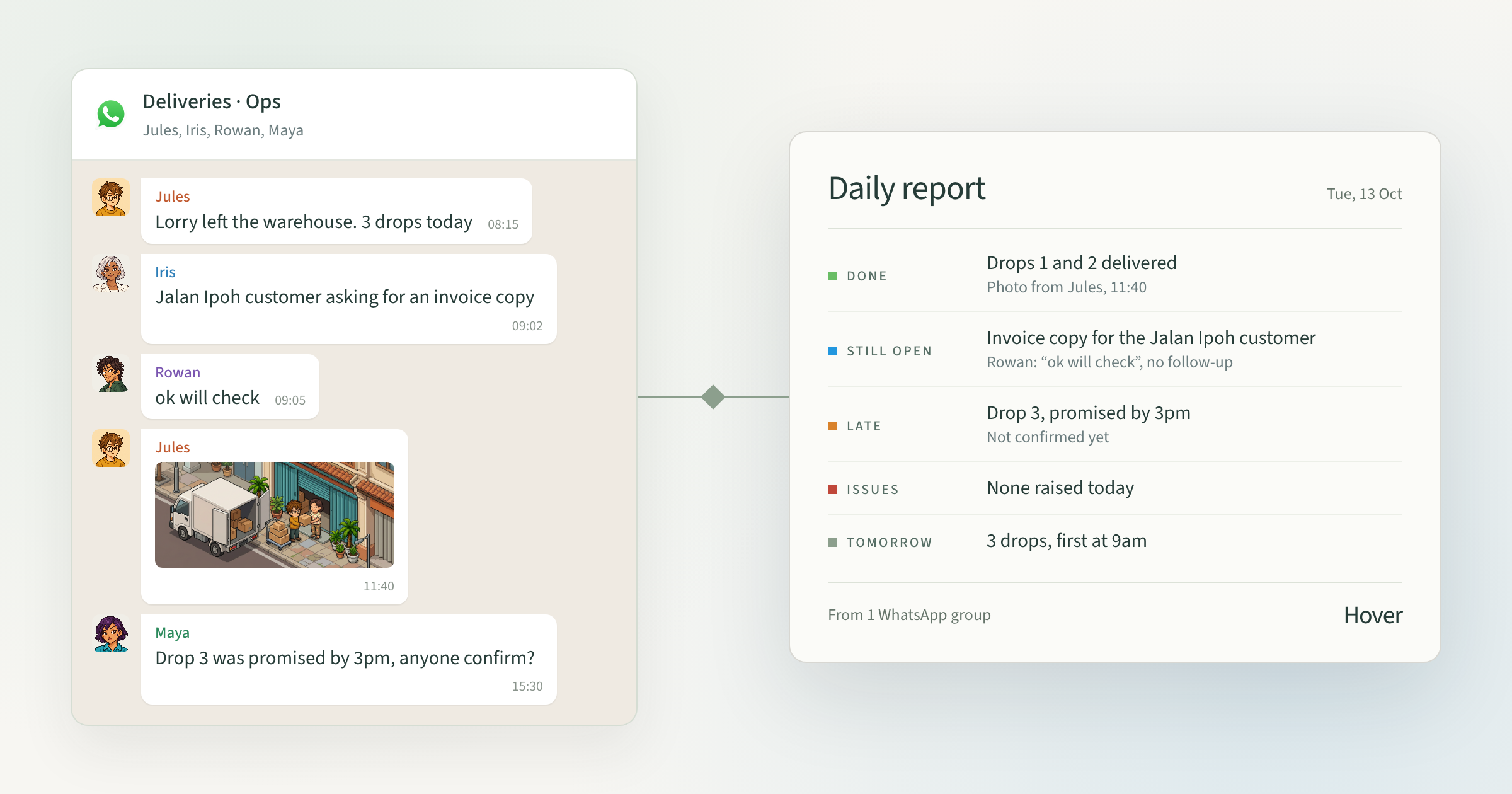
How to do it yourself with AI (good for a week)
You don’t have to sort the messages yourself. An AI assistant such as ChatGPT, Claude or Gemini can do the first pass.
- Export each group chat at the end of the day (Group info → Export chat).
- Upload the export to your AI assistant with the prompt below.
- Check the answer against the chat, especially jobs closed with a photo or a one-word reply.
- Post the five sections back to the team.
Copy this prompt:
Here is today’s WhatsApp group chat from my team. Turn it into a daily report with five sections: Done today, Still open, Late, Issues, Tomorrow.

- Treat a photo or a short reply like “ok”, “done” or 👍 after a request as that job being done.
- A request with no reply is Still open.
- List each item on one line, with who and what time.
- Only use what is in the chat. If you are not sure, mark it “check”.Try this for a week. You’ll quickly see two things. Your chats really do contain everything you need, and even with AI, someone still has to export, paste and check every group, every day.
Where it breaks down
- Nobody types “done.” Proof lives in photos and short replies, so the AI has to guess what was finished.
- Many groups, many people. Every group uses its own shorthand and slang.
- It forgets yesterday. Each upload starts from zero, so a request left open on Monday drops out of Tuesday’s report.
- It’s always one day behind. By the time the report is written, the problems in it are already old.
How Hover does it
Hover reads your team’s WhatsApp groups and turns them into a daily report automatically:
- Sorts what’s done, open and late, including jobs closed with only a photo
- Warns you about requests still waiting for a reply, without flooding everyone with notifications
- Sends the report in the same format every day, so you can compare one week with the next
Setup is quick. Day 1, we connect your groups and set up the report. By day 3 it’s running correctly. After that it keeps improving as it learns how your team talks.
Start with one group
You don’t need to change how your team works. Pick your busiest WhatsApp group and try the manual steps above for a week. If the report is useful but takes too long to write, that’s exactly the job Hover does for you.