Use your ChatGPT plan
Use the ChatGPT plan you already have to power your Tags.
Already pay for ChatGPT? Your Tags can run Codex on that plan. You don't need an API key or a separate Codex sign-in. You connect once, and all your Tags share the connection.
Connect in the app
- Make sure Codex is installed on your Mac.
- Open Settings → General → AI connections.
- Next to Codex, choose Change account.
- Choose ChatGPT account for all Tags, then Continue in browser.
- In your browser, choose Continue with ChatGPT and allow Tag to use your plan.
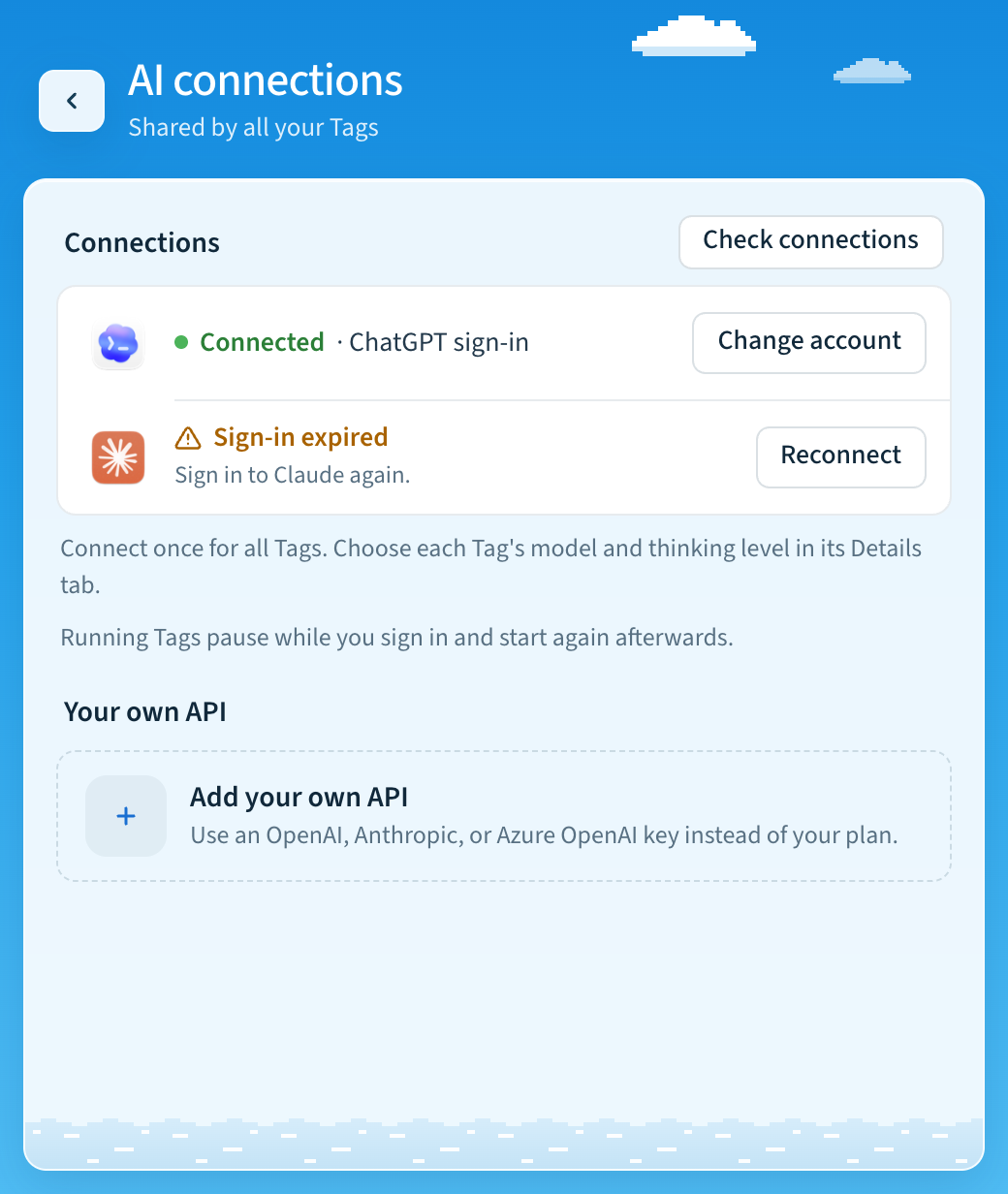
When it works, Codex shows Connected · ChatGPT plan. Running Tags pause while you sign in and start again afterwards, even if sign-in doesn't finish. Then choose each Tag's model in its Details tab.
If Codex shows Sign in or Reconnect instead of Change account, use the terminal command below.
If you reach a usage limit
Codex shows Usage limit reached. Choose Review usage to check your plan at ChatGPT Settings → Usage. When you're ready, choose Resume.
Connect in the terminal
Install Codex, then run this in a local terminal:
tag settings ai sign-in codex --method chatgpt --restart--restart stops running Tags while you sign in and starts them again
afterwards, including if sign-in fails.
How the connection works
Tag can use an explicitly connected ChatGPT account to run its Codex backend. This optional connection is available for eligible open-source and locally hosted apps. Your account, workspace policy, plan limits, and provider availability still determine which requests succeed. See OpenAI's integration documentation.
New registrations send Tag as the display-name hint. The browser displays Continue with ChatGPT and asks permission for Tag to use your plan. OpenAI controls this page; its documented dynamic-registration flow has no custom-icon parameter. Returning sign-ins reuse the saved registration, so a local name change does not rename an existing registration. Tag verifies your identity and the returned grant before making the connection active. A connection does not import ChatGPT conversation history. You do not need to sign in to Codex separately for this mode. AI connections holds one shared connection per provider for all Tags. Choose a model and thinking level in each Tag's Details tab or during setup.
Existing installations using native Codex sign-in retain it until you explicitly
connect. Every authorized Slack requester uses the installation's selected
provider account. Account commands are global; tag NAME chatgpt and named-Tag
sign-in commands are rejected.
Accounts and usage
tag chatgpt status
tag chatgpt status --json --limit 10
tag chatgpt login ACCOUNT
tag chatgpt login ACCOUNT --consent
tag chatgpt use ACCOUNT
tag chatgpt logout ACCOUNT
tag chatgpt use-codex
Replace ACCOUNT with an issued account ID shown by status. The ID distinguishes
registrations even when their emails match. login without an ID registers a
new account; with an ID it renews the existing registration. --consent explicitly
asks for plan permission again after a decline. use validates or refreshes a
saved connection before selecting it. Stop all Tags before using these account commands, then restart the Tags you
need so their model pickers reload the shared account's catalog.
logout defaults to the active account, attempts to revoke its renewable session,
and clears local tokens while retaining the registration for future sign-in.
If remote revocation cannot be confirmed, Tag reports that explicitly. Disconnect
the app in ChatGPT Settings to complete remote revocation. Signing out stops new
plan requests; it never silently switches to Codex credentials or API billing.
Choose use-codex explicitly to restore inherited Codex authentication.
Review plan usage and app-specific limits at
ChatGPT Settings → Usage. A limit error does
not necessarily mean your entire subscription is exhausted. Tag pauses new plan
requests after this error. Once you have reviewed the limit, stop all Tags, run
tag chatgpt use ACCOUNT to explicitly resume requests, and start them again.
Resume in Settings → AI connections (tag settings ai resume --restart) does
the same for the selected account.
For automation, status --json is read-only and includes no tokens. Mutating
commands support --dry-run. Browser login fails promptly without an interactive
terminal; complete consent locally first. tag chatgpt login --json is
intentionally unavailable. The app uses tag settings ai sign-in codex --method chatgpt --json, which opens the browser on this computer, reports
progress as JSON lines, and can be cancelled. Refresh runs automatically without a terminal during startup and
before tasks.
Storage and recovery
The installation stores schema-versioned credentials in
$TAG_HOME/shared/ai/chatgpt/accounts.json. The installation
stores its stable host ID in state/chatgpt-host.json. Credential writes are
atomic and private; refresh operations are serialized across processes. A
failed or interrupted write does not count as a completed update.
Upgrade/startup migrates old per-Tag account files automatically before readiness
checks. Migration version 1 preserves registrations, verifies the shared store
before recording completion, and can safely retry after interruption. Old files
remain for recovery and are never imported again after publication. If Tags had
different selected accounts or billing methods, no account is silently selected:
choose the shared account in Settings, or stop all Tags and run
tag chatgpt use ACCOUNT. Models and thinking levels remain per Tag.
Do not share, commit, or include these files in support reports. Older Tag folders may still contain retained migration credentials. On a different host, sign in again to bind that host's ID to the registration; do not copy the installation's host ID to a second machine. This remains Tag's trusted local-account security model.
When a refresh is permanently rejected, Tag clears the unusable tokens and tells you to sign in again with the saved account ID. Temporary network failures retain your credentials. If a new sign-in code expires, Tag retains the pending client ID and prints the command to retry that registration.
Current limits
- Use the
app-servertransport. Legacyexecdoes not support this connection. - Fast mode and known unsupported hosted tools are disabled for this provider.
Local shell and MCP tools can still run; configurations that emit Responses
tool_searchor another unsupported capability can fail. The provider's preview limitations are authoritative. - A visible model is a choice, not a guarantee of access. Only a completed task verifies inference for that request.
- Long tasks renew their connection by interrupting, restarting App Server, and resuming the same local thread. If interruption cannot be confirmed, Tag stops rather than rerunning the task. The original maximum task duration still applies.
- These threads are saved in local Codex history for renewal. Each Slack thread keeps one Codex thread (see Supported capabilities); global Codex sign-in and configuration are not modified.
Manual qualification
Before claiming a connection works for a real account, complete browser consent,
check the selected account with tag chatgpt status, start Tag, and complete one
Slack task. Also verify a declined grant, repeat sign-in, account switching,
sign-out, and limits/revocation recovery with the intended deployment account.
Automated tests do not prove OpenAI eligibility or live inference.
Last updated