Models
Choose any model that runs in Codex or Claude Code, use a plan you have, or bring your own API key or gateway.
Any model that works in Codex or Claude Code works in Tag. Pick one for each Tag, switch whenever you like, and pay with a plan you already have or your own API key.
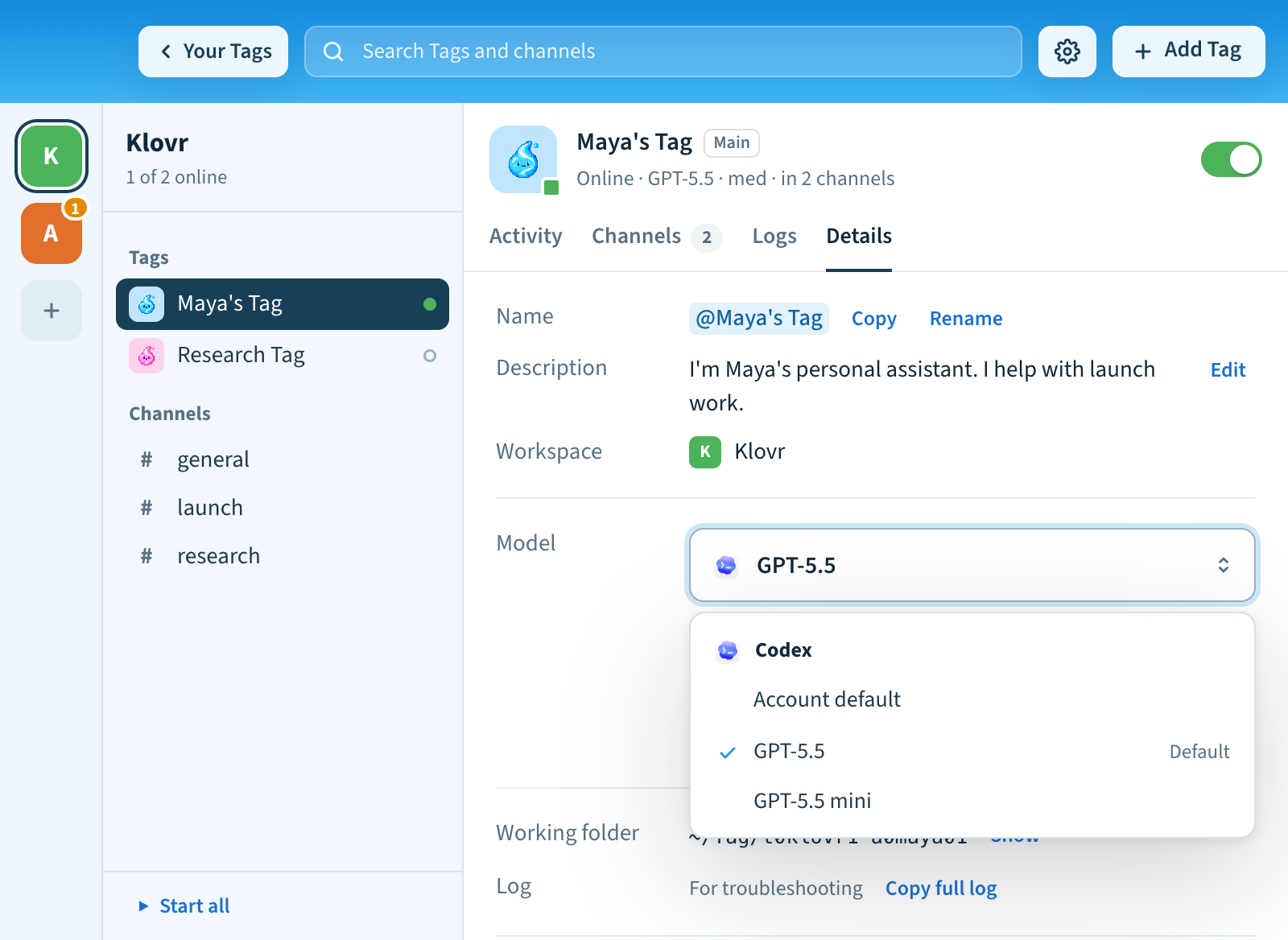
Choose and switch a model
In the app, click a Tag and open its Details tab. Choose a Model, then a Thinking level. The levels you see depend on the model.
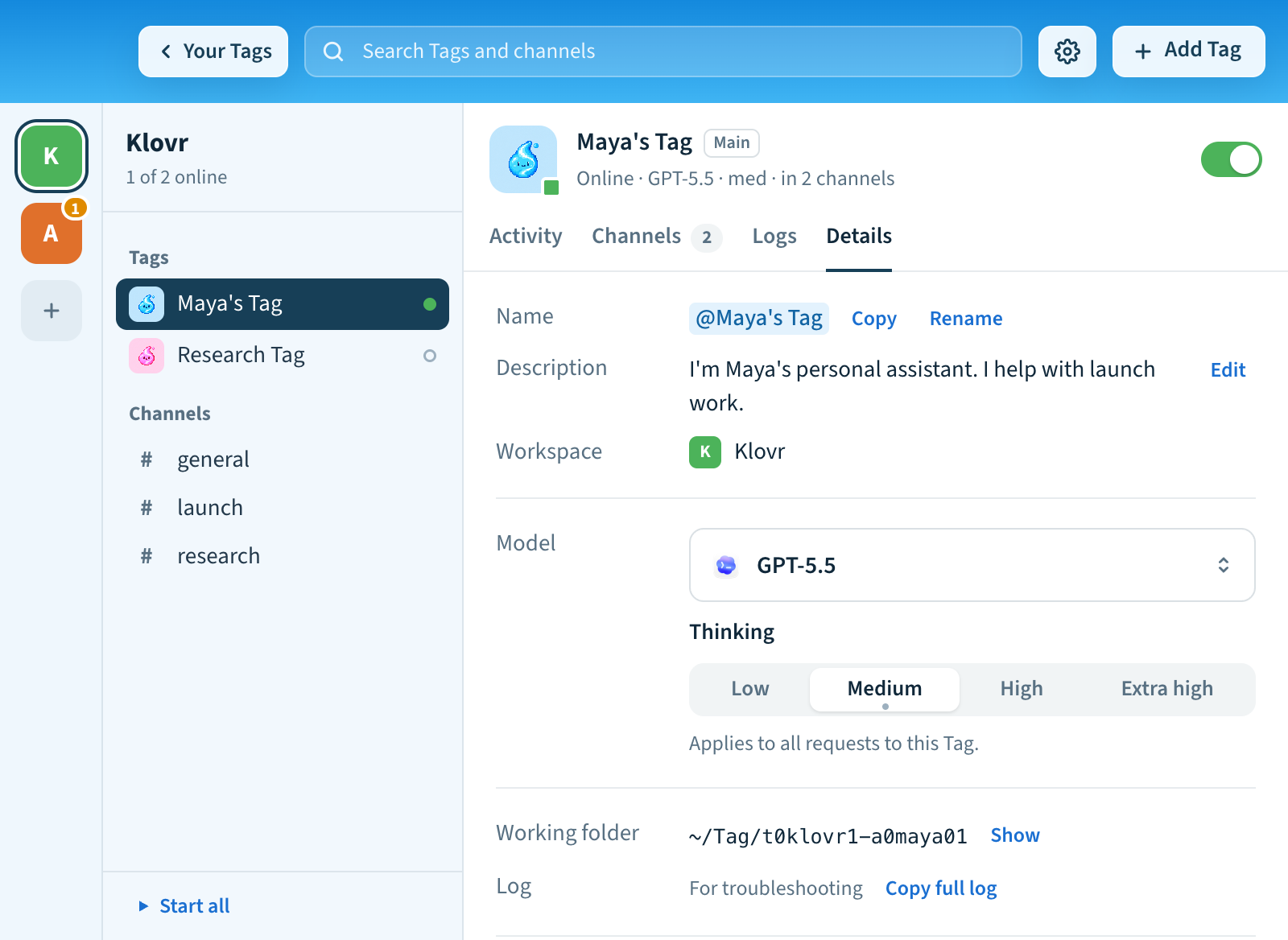
In the terminal:
tag settings ai models                          # what your accounts can use
tag settings ai model codex:gpt-5.5 --effort medium
The list comes from the accounts you've connected. Tag saves your choice and restarts the Tag if it's running, and every request uses that model.
Use a plan you already have
Sign in with your ChatGPT plan (for Codex) or your Claude plan (for Claude Code)
in Settings → General → AI connections, or with tag settings ai
in the terminal. All your Tags share these sign-ins. Choose Check
connections to test them. If a sign-in has expired, choose Reconnect.
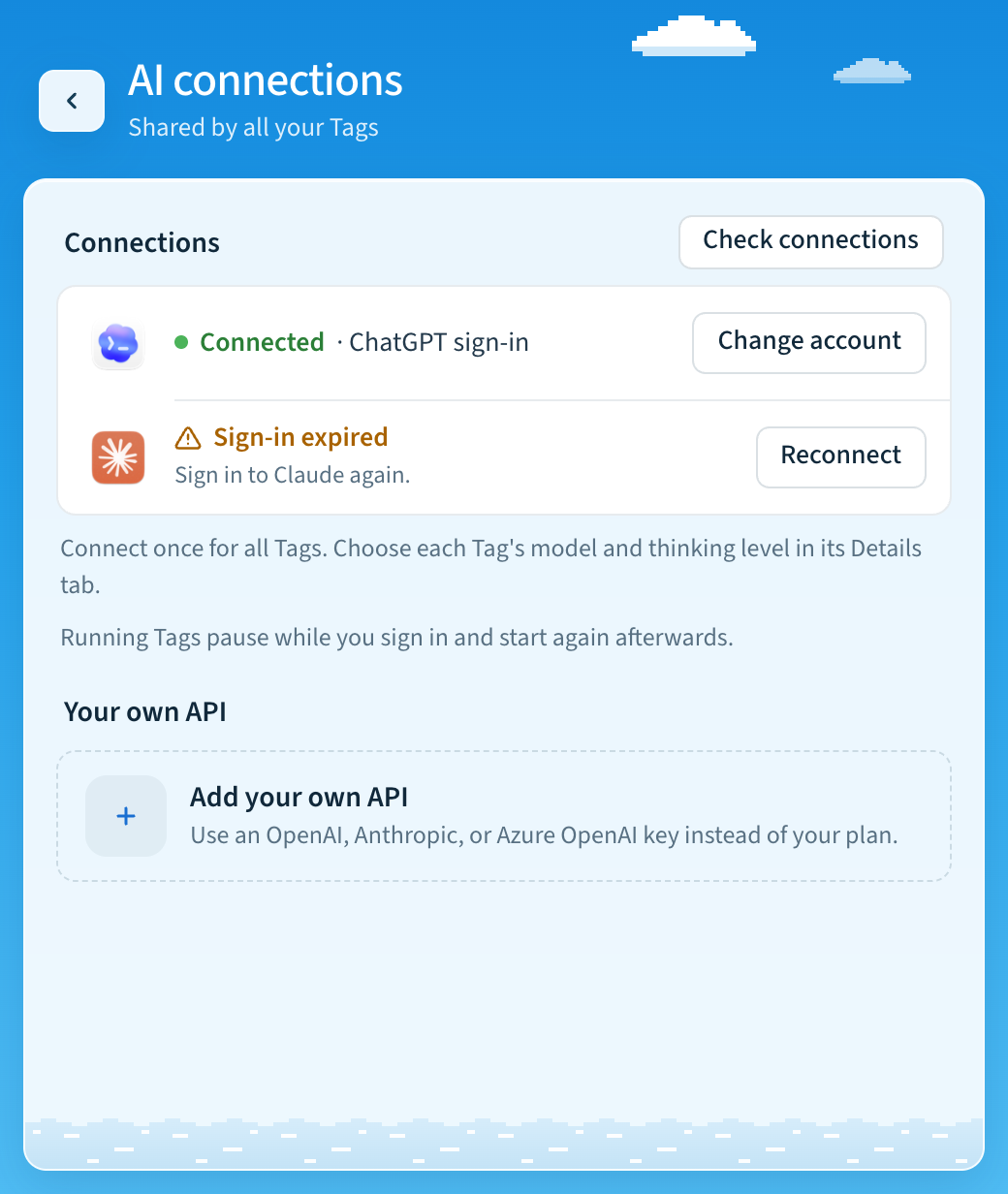
See Use your ChatGPT plan for details.
Use your own API
A compatible API is any service that speaks the same language as Codex or Claude Code, so Tag can send requests to it instead of to OpenAI or Anthropic directly. That could be your company's AI gateway, a provider proxy, or your own OpenAI or Anthropic API key.
- For Codex, the service must support the OpenAI Responses API. Chat Completions-only endpoints don't work. Azure OpenAI works too.
- For Claude, the service must support the Anthropic Messages API.
In the app
- Open Settings → General → AI connections and choose Add your own API (or Add next to Your own API).
- Choose the agent: Codex or Claude.
- Enter the base URL (leave it empty to use OpenAI or Anthropic directly), your models separated by commas, and the API key. The first model is the default. For an Azure OpenAI URL, Tag asks for the API version; the models are your deployment names.
- Choose Save. The API applies to all your Tags. Running Tags restart, and any Tag that can't start keeps its previous connection.
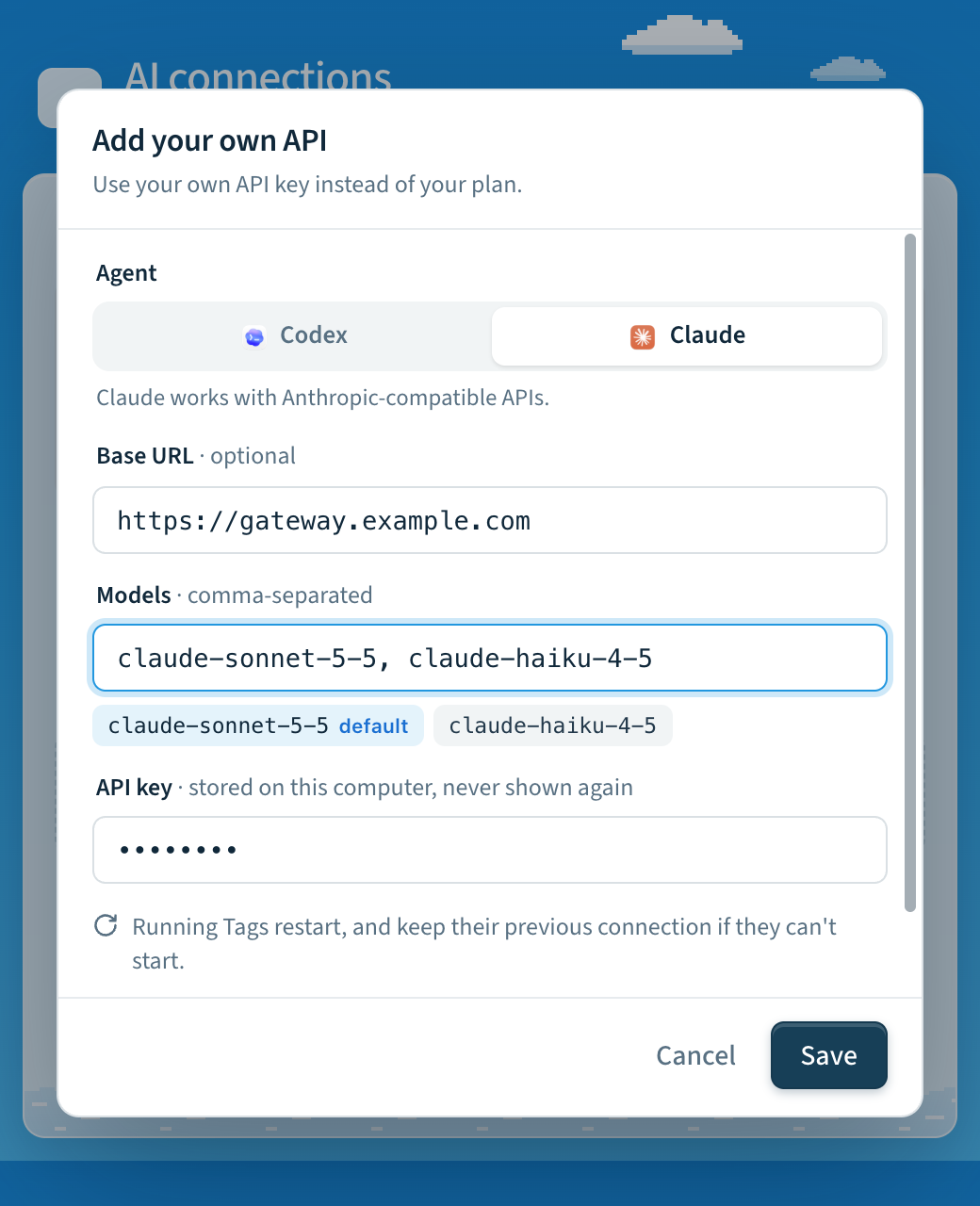
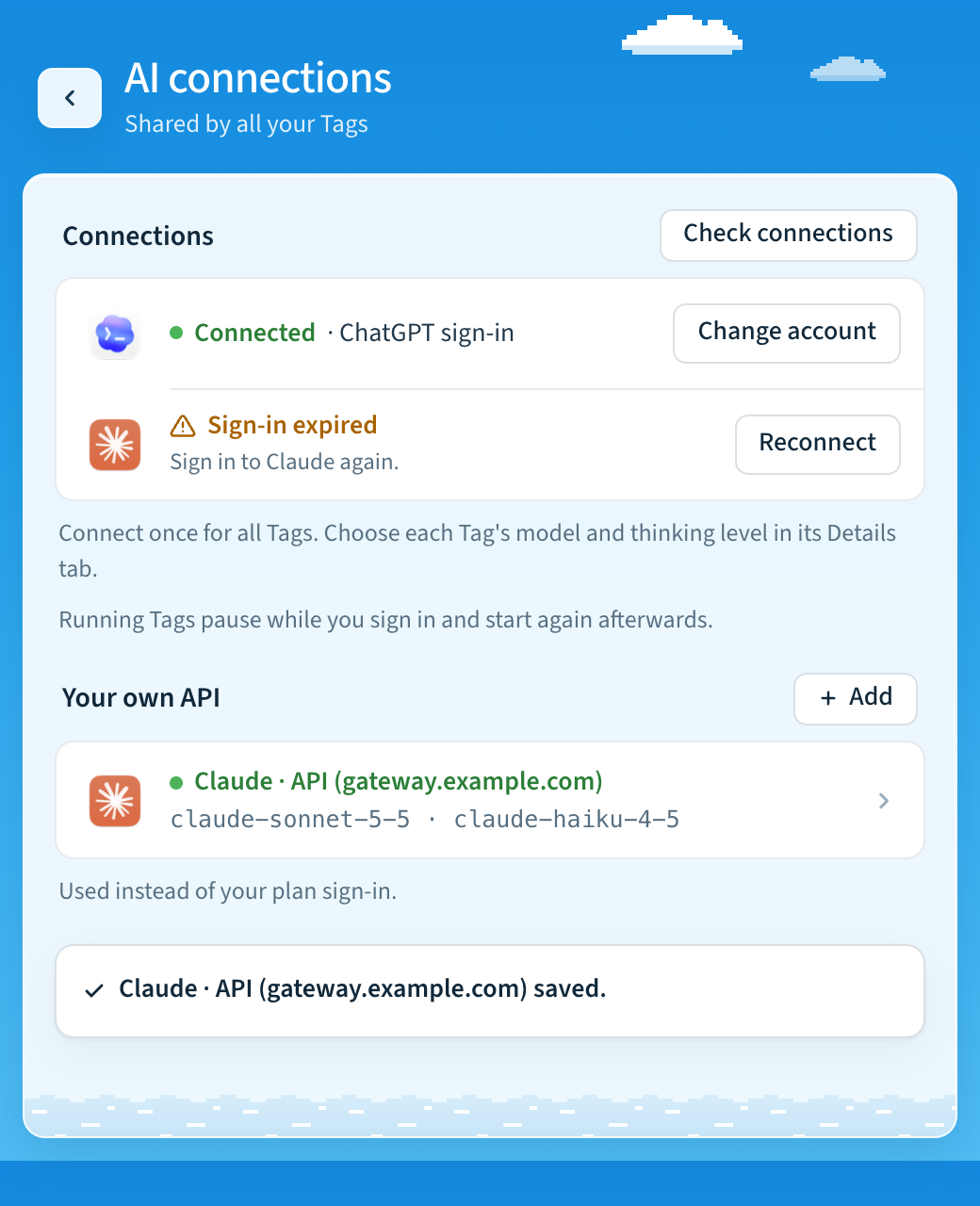
Your API then appears under Your own API, for example
Claude · API (gateway.example.com), with its models. Open it to change the URL,
models or key, to Check connection, or to Switch back to my plan.
Check connection sends nothing to the provider, so it spends no tokens; your
first real request confirms the key and model work. The key is stored on your
Mac and never shown again.
Then pick the model
Open a Tag, go to Details, and choose one of your API's models under Model. It works the same way whether a model comes from your plan or from your API. A Tag whose model runs on the other agent keeps its model until you pick one of the API's models.
In the terminal
Copy your key, then run one command. pbpaste sends the key straight from your
clipboard, so it never appears in your shell history.
# An OpenAI-compatible gateway, for Codex
pbpaste | tag settings ai api set --backend codex --kind openai \
  --base-url https://gateway.example.com/v1 --models gpt-5.5,gpt-5.5-mini --restart

# An Anthropic-compatible gateway, for Claude
pbpaste | tag settings ai api set --backend claude --kind anthropic \
  --base-url https://gateway.example.com --models claude-opus-5-5 --restart

tag settings ai api check --backend codex              # check without spending tokens
tag settings ai api clear --backend codex --restart    # back to your plan
Leave out --base-url to use OpenAI or Anthropic directly. Add the Tag's name
after tag to set up one Tag instead of your main one, for example
tag research-tag settings ai api set …. set checks every input before it
stops anything, saves everything at once, and restores your previous settings
if the Tag can't start. Use the model IDs your gateway expects.
API connection reference
Each Tag can use an explicit API connection for Codex or Claude. Existing Tags
continue to inherit their CLI sign-in unless you select an API connection.
The CLI binaries are still required; Claude also requires Tag's bundled Agent SDK.
Set them up in the app or with tag settings ai api as described above; the
underlying settings are per Tag.
The sections below describe each provider and the underlying settings. The
tag config set commands still work. With them, stop the Tag first and select
the authentication mode last.
Azure OpenAI with Codex
Configure a Responses-compatible Azure deployment. The model name is your Azure deployment name, which may differ from the underlying model name.
tag settings ai api set --backend codex --kind azure \
  --base-url https://YOUR_RESOURCE.openai.azure.com/openai \
  --api-version 2025-04-01-preview --models YOUR_DEPLOYMENT_NAME --restart
Use the API version supported by your Azure deployment. For Azure's versionless
/openai/v1 Responses endpoint, set that full base URL and omit
--api-version. Tag sends the resource key in the api-key header. Microsoft
Entra token acquisition/renewal is not implemented by this connection mode.
OpenAI or a compatible Codex gateway
Use --kind openai. The default URL is https://api.openai.com/v1; optionally
set --base-url to the full API base of a Responses-compatible gateway. API mode
uses bearer authentication. Chat Completions-only endpoints are unsupported.
The underlying settings are OPENTAG_CODEX_AUTH=api, OPENTAG_CODEX_BASE_URL,
OPENTAG_CODEX_API_KEY, and OPENTAG_CODEX_MODELS.
For custom Codex endpoints and Azure, Tag disables Codex's provider-hosted web
search, hosted image generation, and multi-agent tools on every launch. Recent
Codex versions group multi-agent tools in a Responses namespace, which gateways
accepting only function/custom tools reject even for a greeting. Local coding
tools and configured MCP servers remain available through Codex Code Mode: the
model calls exec (a custom tool) and wait (a function tool), which invoke the
underlying tools locally. This avoids sending MCP/app tool namespaces as well.
MCP search can provide web search separately, subject to gateway compatibility.
Custom gateways must support Responses custom tools and the installed Codex
must support Code Mode; this path was checked with Codex 0.157.1.
Direct api.openai.com and inherited
connections retain their existing tool settings. This applies automatically to
existing Tags without changing stored settings or global Codex configuration.
Claude uses the Anthropic protocol through its SDK; this Responses-specific
override does not apply. Claude gateway tool support depends on that gateway.
Explicit API mode takes precedence over a saved Tag ChatGPT plan connection and
global Codex sign-in. Failure never switches to another billing account.
tag settings ai api clear --backend codex (Switch back to my plan in
the app) returns to the saved plan connection or inherited Codex
authentication. Tag does not modify global CLI credentials.
Claude API or an Anthropic-compatible gateway
Claude gateway provider-routing fields are not supported. Claude uses the native
Anthropic protocol; Codex's optional provider.only adapter does not apply.
Unsupported Claude routing environment settings fail validation rather than being
silently ignored.
tag settings ai api set --backend claude --kind anthropic --models YOUR_CLAUDE_MODEL_ID --restartThe default URL is https://api.anthropic.com. Override it with --base-url
(OPENTAG_CLAUDE_BASE_URL) for an Anthropic-compatible gateway. Tag passes the
key and URL to the Agent SDK and clears inherited OAuth/auth-token and
cloud-provider switches for that child connection.
tag settings ai api clear --backend claude returns to existing Claude CLI
authentication. Azure support here is for Codex; Claude's explicit API mode
does not provision a Foundry connection.
Models, readiness, and credentials
Explicit connections require a nonempty model list. These operator-declared models populate settings without consulting another account's model catalog. Listing a model does not prove entitlement or successful inference. Fast Mode and advertised reasoning controls are unavailable for these custom catalogs because Tag cannot verify provider support. API connections require Codex App Server or Claude Agent SDK; legacy exec/print transports fail closed.
Setup recognizes preconfigured API connections. tag doctor validates their
configuration and runtime dependencies; it does not spend tokens to test keys.
tag status distinguishes configured API credentials from a verified sign-in.
The first real task verifies inference and permissions for the deployment.
Base URLs require HTTPS, except local HTTP gateways. Embedded credentials, query
strings and fragments are rejected; Azure API versions use the separate setting.
Keys are stored in Tag's private settings with owner-only permissions, omitted
from tag config show, and redacted from diagnostics and emitted events.
The existing trusted sandbox credential boundary
still applies: local agents with shell access can access inherited credentials.
Usage and advisory budgets
tag config set OPENTAG_MONTHLY_BUDGET_USD 50
tag usage
tag usage --json
Usage covers Codex App Server and Claude Agent SDK tasks, including inherited sign-ins, from the time this feature is installed. The local ledger contains numeric usage and attempt outcomes, with no prompts, answers, keys or endpoint URLs. It is independent of anonymous telemetry. Legacy transports and other clients' tasks are not recorded. Months use UTC and each attempt belongs to the month in which it started. Retries are distinct attempts; repeated cumulative notifications replace a snapshot rather than adding it again.
Input totals include cached input and reported cache writes for both backends; Codex reasoning tokens are a subset of output. Do not add these subsets again. Claude supplies a final usage/cost estimate; interruption before its result may leave usage unknown. Codex reports cumulative thread usage as it runs. A forced termination may leave only a partial snapshot. Missing usage, missing cost, and unfinished attempts are reported separately. An empty ledger is not a claim that your provider account has never incurred charges.
Claude's reported cost is an SDK estimate. To estimate Codex/Azure costs, configure your deployment's prices in USD per million tokens:
OPENTAG_CODEX_INPUT_USD_PER_MILLION: ordinary input, excluding cache reads and writes.OPENTAG_CODEX_OUTPUT_USD_PER_MILLION: output, including reasoning tokens.OPENTAG_CODEX_CACHED_INPUT_USD_PER_MILLION: cached input reads.OPENTAG_CODEX_CACHE_WRITE_USD_PER_MILLION: cache writes. Required for an estimate when Codex reports a nonzerocacheWriteInputTokenscount.
No prices are assumed. Missing applicable prices make cost unknown. These rates apply to all Codex models for this Tag; use separate Tags when deployments have different prices. Each snapshot saves its estimate using the prices active for that process; subsequent price changes do not reprice historical usage. Earlier snapshots that omitted cache-write counts cannot be reconstructed. Tool charges, hosting, discounts, tax and other provider charges are not included. Custom Claude gateway prices may differ from SDK estimates.
The monthly budget is advisory. Tag reports when recorded estimated costs reach it, but does not stop tasks, reserve concurrent spend, or impose a provider-side cap. Incomplete usage can understate spending. Use provider billing controls for an enforced financial limit.
Storage is an additive, versioned SQLite ledger in .tag/state/usage.sqlite3.
Its schema is created automatically on first recorded use, including on upgraded
installations. Creation and repeated startup are idempotent; committed snapshots
survive interruption. No old authentication or operator setting is rewritten.
Codex provider configuration follows the official configuration documentation. Live provider inference requires account-specific qualification; mocked transport checks do not establish Azure deployment or Anthropic account access.
Optional Codex gateway provider routing
Some gateways choose among upstream providers separately from the model ID.
For a gateway supporting the provider.only request field, configure both
routing settings:
tag config set OPENTAG_CODEX_GATEWAY_FORMAT provider.only
tag config set OPENTAG_CODEX_GATEWAY_PROVIDER cursor_sdk
tag config set OPENTAG_CODEX_MODELS grok-4.7
tag config set OPENTAG_DEFAULT_MODEL codex:grok-4.7
tag restart
This requires OPENTAG_CODEX_AUTH=api and an explicit gateway base URL. The
model remains grok-4.7; Tag adds "provider":{"only":["cursor_sdk"]} to
Responses request bodies. It does not interpret provider prefixes in model IDs.
Only this routing format and one provider are supported initially; this is a
gateway extension, not a standard OpenAI field. Azure and Claude routing are
explicitly unsupported. Clear both settings and restart to disable routing.
When configured, each Codex App Server process gets an authenticated, random-port
loopback adapter. Its token is passed through the child environment, not command
arguments. The adapter removes OPENTAG_CODEX_API_KEY from the child environment;
it retains that key for upstream requests. This does not isolate credentials on
disk or remove other inherited credentials; Tag retains its trusted-sandbox
credential boundary. The adapter
replaces any competing provider selection, forwards streamed bytes and upstream
error statuses, and performs no retries, redirects, or provider fallback of its
own. Codex's normal retry policy still applies. Request compression is disabled
for this route. Task shutdown closes the listener and active sockets; a failed
Codex launch also closes the adapter. No prompts or credentials are logged by the
adapter.
Both settings default to absent. Existing installations require no stored-data migration: each new task derives the route from current configuration and creates fresh temporary resources. Repeated startups do not rewrite operator settings; no completion marker or credential migration is needed. Connections without routing configured keep their existing direct path.
Temporary chat-only gateway testing
For a routed Codex connection whose upstream rejects tool declarations, set
OPENTAG_CODEX_GATEWAY_DISABLE_TOOLS=1 and restart the selected Tag. The adapter
omits tools, tool_choice, and parallel_tool_calls and tells the model that
it can only respond with text. Search, file access, commands, and other agent
actions are unavailable. This is a diagnostic mode, not a tool compatibility fix.
Set the value back to 0 and restart to restore tools. It defaults to off and
requires explicit Codex gateway routing; inherited connections, Azure, and Claude
are unsupported. Use tag NAME config set for another Tag.
Last updated