What's New
What's new in Tag 0.3: the Tag app for macOS, shared AI connections, and more.
Tag 0.3 brings Tag, a desktop app for macOS. It installs Tag, sets up new Tags, keeps them running, and shows what they did. You don't need a terminal. Claude joins Codex as a full agent, all your Tags share one set of AI sign-ins, and each Slack thread now keeps one agent conversation.
Already using Tag 0.2? You don't need to set anything up again. Tag upgrades your settings, credentials, and Slack apps the next time it starts. See Upgrade from 0.2.
Highlights
- Tag for macOS. Install, add, start, stop, rename, and remove Tags without a terminal. It lives in the menu bar. Windows and Linux are coming soon.
- Claude is a full backend. Claude runs through the Claude Agent SDK with the same Slack behavior as Codex: streamed answers, live activity, private approvals, Stop and timeouts.
- Shared AI connections. Sign in to Codex, a ChatGPT plan or Claude once, and every Tag can use it. Each Tag keeps its own model and thinking level.
- Threads remember the conversation. Follow-up mentions in a Slack thread continue where the last reply stopped, for both backends.
- Keep Tags running. A login service starts your Tags and restarts any that stop.
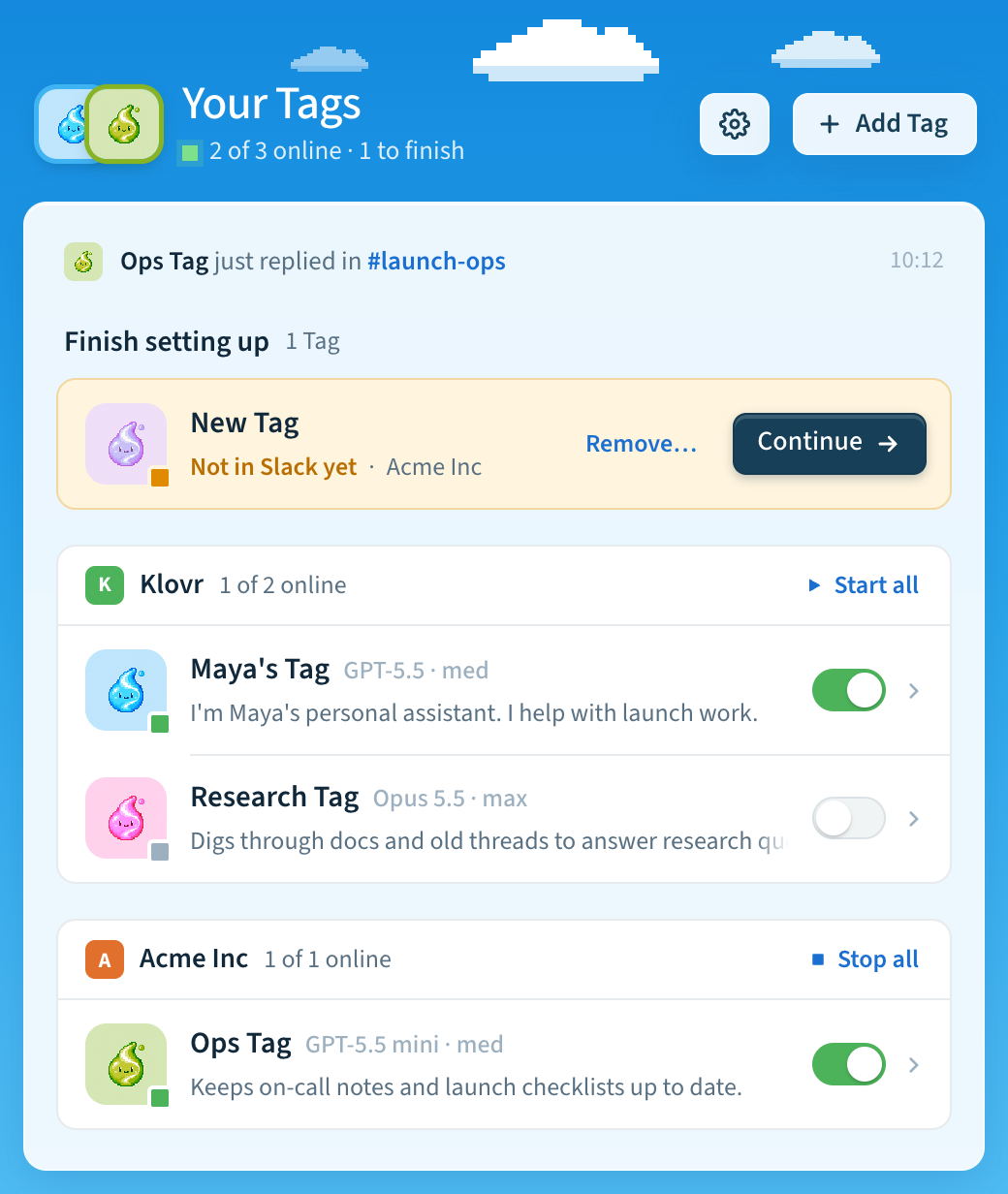
Home shows all your Tags, grouped by Slack workspace, with a switch to start or stop each one.
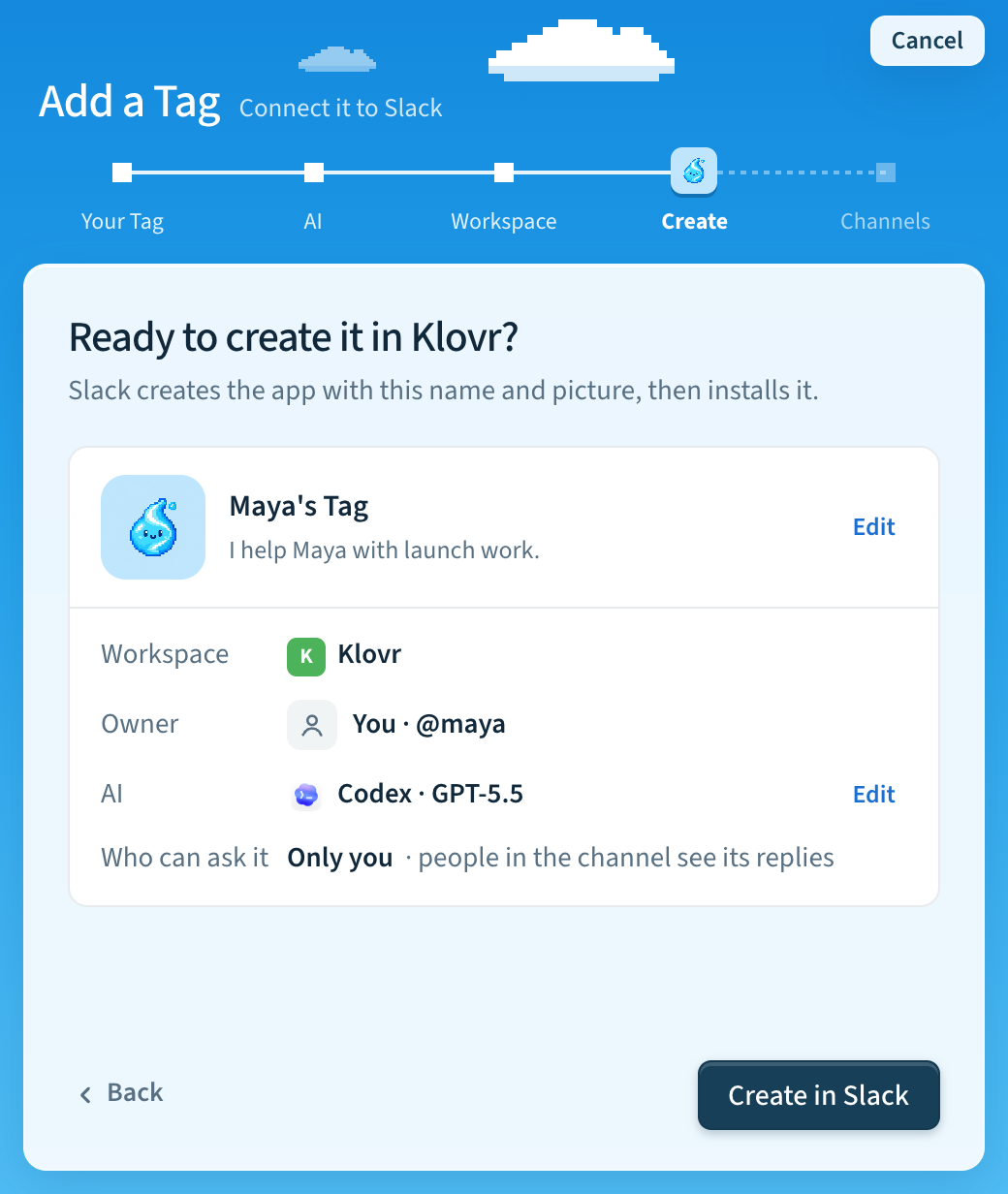
Adding a Tag takes five short steps: Your Tag, AI, Workspace, Create, and Channels. One recap shows everything before anything changes in Slack.
Get Tag
Download Tag from the GitHub release for your computer:
| Platform | Download |
|---|---|
| macOS (Apple silicon and Intel) | Universal .dmg |
Windows and Linux: coming soon. Until then, use the terminal installer.
On first run, the app installs the Tag runtime and shows its progress. You don't need to install Python or the Slack CLI first. Then it walks you through adding your first Tag.
flowchart LR
  A[Open Tag] --> B[Install<br/>runtime]
  B --> C[Name, description<br/>and picture]
  C --> D[AI model]
  D --> E[Slack<br/>workspace]
  E --> F[Recap]
  F --> G[Tag starts]
You can still install and run Tag from a terminal with install.sh or
install.ps1. The app and the CLI share the same Tags, settings and lifecycle,
so you can use either. See the installation guide.
Everything new in 0.3
Desktop app
- Home lists your Tags by Slack workspace with each Tag's picture, model and thinking level, and shows the latest reply or a Tag that needs attention.
- Tag detail has four tabs: Activity (each reply grouped by Slack thread, with a one-sentence summary and its steps), Channels, Logs and Details (model, thinking level, description, Rename and Remove).
- Settings has General (appearance, AI connections, usage data), Updates (release channel) and About (replay onboarding).
- The app can open at login, keep your Tags running, and notify you when a Tag goes offline. It updates itself and your Tags together.
- A "Tag app" link in a Slack message opens that Tag's Details in the app.
- Errors explain what to do next and clear once a retry works.
Setting up a Tag
- Setup now starts with the Tag itself: name, description and picture. Then
you pick the AI model and the Slack workspace, and one recap shows everything
before Slack changes. The app and
tag setupfollow the same steps. - The new Tag starts on its own, and the app shows each start step. Two Tags can start at the same time.
- You can reuse an existing Slack app, pick who can use the Tag from a list of Slack people, and connect developer sandboxes and Enterprise organizations.
- Each Tag has its own folder, such as
~/Tag/t0abc123-a0xyz789, and several Tags can share one workspace.
AI connections and models
- Codex and Claude both support streaming, live activity, approvals, Stop, timeouts and per-thread conversations.
- Connect a ChatGPT plan to run Codex. Tag renews the token for you.
- Use other AI providers and API gateways with your own API keys and base URLs for Codex or Claude, including Azure OpenAI for Codex and an optional gateway provider. See Models.
tag usageshows token usage, estimated cost and an optional monthly budget.- Model and thinking level belong to the Tag. Slack no longer shows Configure.
In Slack
- Live activity shows short steps in the thread while a task runs.
- Codex approvals offer Allow once, Allow for this task, Deny and Deny and stop. Claude offers Approve once and Deny.
- Saved files are attached to the thread by default and kept locally.
- Tag can reopen files shared earlier in a thread and keeps generated images.
- Failed requests are shown privately to the requester, with Retry, Fix with coding agent and Report issue. See When a request fails.
Upgrade from 0.2
Run tag upgrade, or install the Tag app and let it take over your existing
installation. Tag runs these migrations automatically before it starts your
Tags. Each one is safe to repeat and resumes if it is interrupted.
| Change | What happens |
|---|---|
| Tag folders | Each Tag's settings, credentials and history move into its folder under ~/Tag. The old location stays until the copy is verified. |
| ChatGPT sign-ins | Per-Tag ChatGPT accounts move to one shared account. If your Tags used different accounts, Tag asks you to choose one. |
| Slack settings | Per-person model overrides set with Configure are archived. Each Tag keeps its default model and thinking level. |
| Slack app | Tag adds team:read so the app can show workspace icons. A Tag still starts if this scope isn't granted yet. |
| File delivery | Tags without a saved choice start attaching saved files to Slack. An explicit local choice is kept. |
| Python and memory | Tag prepares its own Python and updates the managed memory server, keeping indexes and credentials. You no longer need the mfs client. |
When Slack or a provider needs you to sign in again or an admin to approve, Tag says exactly what to do and resumes on the next start.
Known limitations
- Live installation, Slack replies, upgrades and app self-updates still need qualification. Windows Slack/backend operation through the terminal installer has not been qualified live.
- The desktop app is offered for macOS only. Windows and Linux app builds are attached to releases but untested; support is coming soon.
- API keys and gateway routing are set with
tag config set; the app's AI connections screen doesn't manage them yet. - Claude approvals are one-time only. Task-scoped grants, persistent rules and approval retries are Codex-only.
- Usage budgets are advisory. They don't stop tasks.
- Additional callers beyond the owner are not yet part of the supported flow.
- Tag runs with your account's files, credentials, tools and permissions. Use it with trusted people and workspaces; it is not a hardened multi-tenant security boundary.
See the release contract, the installation guide, supported capabilities and the security policy.
Last updated